
Imagine ordering a humanoid robot online and having it delivered to your door. A few years ago, that would have sounded like science fiction. Now it’s becoming a real possibility.
But what happens after you’ve unpacked it?
Can I ask it to fetch something from the fridge? Walk around the house? Or do I need to know how to program robots before it can do anything particularly useful?
I wouldn’t mind having a humanoid robot to experiment with. It would certainly make for an interesting conversation when friends came over. But that’s rather different from buying something useful.
Unitree’s robots look impressive, and the prices are becoming more accessible. The question is whether you’re buying the beginning of a household assistant or a very expensive robotics project.
The answer is the second. Neither the Unitree R1 nor the G1 is a household assistant, and Unitree does not claim otherwise. Out of the box, both are remote-controlled walking robots with a library of preset movements. To make either one do something new, you need the EDU version, a Linux machine and real programming skills. The R1 is the cheaper, lighter entry point for hobbyists and schools; the G1 is the stronger research platform, with twice the battery life, 3D LiDAR and more powerful joints. We have not tested either in our own homes; this comparison is built from Unitree’s published specifications, UK and European retailer listings checked in late October 2026, developer documentation and independent reporting.
Unitree G1 vs R1 at a glance
| Unitree R1 | Unitree G1 | |
|---|---|---|
| Launched | July 2025 | May 2024 |
| Height | About 1.21 to 1.23m | 1.32m |
| Weight | About 25 to 29kg, depending on version | About 35kg |
| Degrees of freedom (standard) | 26 (R1 Air: 20) | 23 |
| Degrees of freedom (EDU) | 24 to 40 | 23 to 43 |
| Arm payload | About 2kg | About 2kg (EDU about 3kg) |
| Battery life | About 1 hour (6,000mAh pack) | About 2 hours (9,000mAh, quick-release) |
| Sensors | Binocular cameras (Air: monocular), 4-mic array, speakers | Depth camera plus Livox MID-360 3D LiDAR |
| Compute | 8-core CPU; EDU adds NVIDIA Jetson Orin | 8-core CPU; EDU adds optional Jetson Orin |
| Hands | None on standard; optional Dex3-1 on EDU | None on standard; optional Dex3-1 on EDU |
| SDK access | EDU only | EDU only |
| UK price seen | R1 Air £4,799.99; R1 EDU from £12,499.99 (Scan) | G1 £20,999.99; G1 EDU from £29,999.99 (Scan) |
| US price | From $4,900 (R1 Air) and $5,900 (R1) | $13,500 excluding tax and shipping (Unitree) |
| Warranty | 8 months standard, 12 months EDU | 8 months standard, 18 months EDU |
Configurations and prices in the UK, EU and US
Unitree’s own pricing is in US dollars and varies by sales channel, and the gap between headline price and what you pay in Britain is large.
R1. Unitree launched the R1 in July 2025 from $5,900, and later added a stripped-back R1 Air at $4,900. In China, the R1 was cut from 39,900 to 29,900 yuan in 2026. When Unitree began selling the R1 internationally through AliExpress in April 2026, Bloomberg reported (via VnExpress International) that listings started at about $6,800 with free shipping to the US, and that the standard R1 came to about $8,150 after import fees. AliExpress sales covered the US, Canada, Japan, the UAE and Singapore, not the UK. In Britain, Scan lists the R1 Air at £4,799.99 including VAT (on pre-order in late October) and a range of EDU versions: EDU Standard at £12,499.99, EDU Smart with 26 degrees of freedom and the optional Jetson Orin at £14,159.99, and EDU Pro editions with two Dex3 hands and up to 40 degrees of freedom from £22,799.99 to £26,399.99. Several of the EDU models were shown in stock. In the EU, French specialist Generation Robots lists the R1 EDU from €18,000 including VAT, out of stock when we checked.
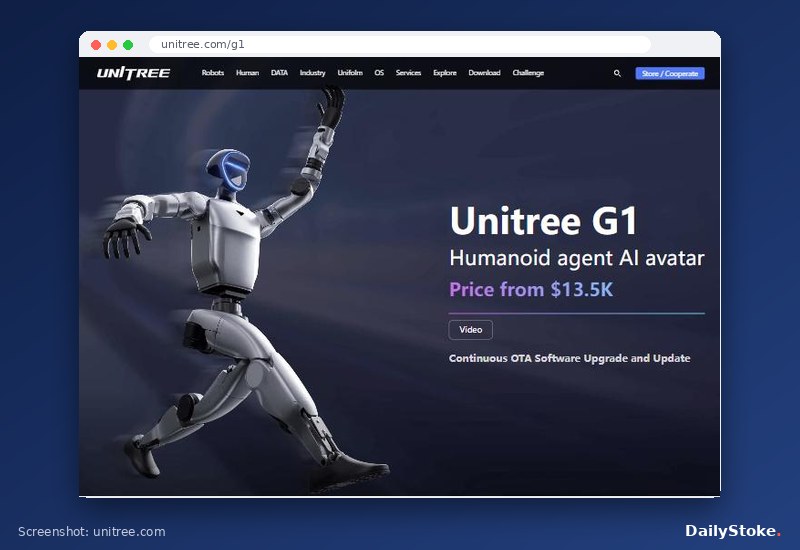
G1. Unitree’s own site lists the standard G1 at $13,500, excluding tax and shipping, with the EDU version on “contact sales”. In the UK, Scan sells the standard G1 at £20,999.99 including VAT, and a ladder of EDU versions: EDU Standard at £29,999.99, EDU Plus at £31,999.99, and Ultimate B, F and D editions from £40,799.99 to £47,999.99. Several were on pre-order. Scan also lists the G1-D, a version on a wheeled base, from £28,799.99 for a stationary edition to £45,599.99. Generation Robots lists the G1 EDU from €27,000 including VAT in the EU, again out of stock.
UK prices include 20% VAT and, at Scan, a pre-delivery inspection and setup service, which explains part of the difference from US list prices.
Hardware compared: what the extra money buys
The G1 is the bigger, stronger and better-sensed machine. It stands 1.32m tall, weighs about 35kg and folds down to 69cm for transport. Unitree quotes maximum knee torque of 90Nm on the standard model and 120Nm on the EDU. It carries a depth camera (Intel RealSense D435i, according to Scan’s listing) and a Livox MID-360 3D LiDAR, which gives it a proper three-dimensional picture of a room. The battery is a 9,000mAh quick-release pack rated for about two hours.
The R1 is shorter, at about 1.21m, and lighter, with about an hour of battery life. It relies on cameras rather than LiDAR, and the R1 Air drops to a single wide-angle camera and fewer joints (20 rather than 26, according to the documentation published by German distributor MYBOTSHOP). It has a four-microphone array and speakers for voice interaction. At launch, CNX Software pointed out that with no working hands on the standard model and limited arm strength, the R1 was not designed to be a household helper.
Neither robot has hands on the standard model. The optional Dex3-1, a force-controlled three-fingered hand with seven degrees of freedom and tactile sensor arrays, is available only on EDU versions. Both arms are rated for roughly 2kg, or about 3kg on the G1 EDU depending on arm posture. That is enough to pick up a cup or a can, not a full laundry basket.
Developer requirements and the Unitree SDK
This is the crucial difference between versions, rather than between models. On Unitree’s own G1 specification page, secondary development is marked as not available on the standard G1 and supported on the EDU. Retailers and price trackers report the same split for the R1, where the SDK comes with the EDU version. If you want to write your own software, you are buying an EDU.
The developer stack is the same across both robots. Unitree publishes unitree_sdk2 for C++ and unitree_sdk2_python, plus unitree_ros2 to bridge into ROS 2. Communication runs over CycloneDDS on a wired gigabit Ethernet subnet. MYBOTSHOP’s R1 documentation lists Ubuntu 20.04, GCC 9.4 with C++17, CMake 3.10 or newer and Python 3.8 or newer as requirements. Unitree also publishes simulation and reinforcement-learning tools on its GitHub, including MuJoCo-based simulation and training environments, so you can test behaviours on a computer before risking a 35kg robot on a hard floor.
In practice, that means you should be comfortable with Linux, networking, Python or C++ and the basics of robot control. Training a new behaviour, such as walking to a kitchen and picking something up, is a research project involving perception, navigation and grasping, not a setting in an app.
What arrives ready to use
Here is what each robot does the day it arrives. Both come with a handheld remote controller and walk and balance using Unitree’s built-in locomotion software. Both run a library of preset motions (waving, handshakes, dance and martial-arts routines) that are the source of most viral clips. The R1’s microphones and speakers allow voice interaction. Unitree pushes over-the-air software updates.
What they will not do: fetch a drink from the fridge, tidy a room, navigate your home by themselves to a named place, or handle objects usefully with the standard model’s fixed hands. Unitree’s own product page warns that the robot has powerful actuation, that people should keep a safe distance, that the industry is at an early stage and that some sample functions are still in development. Take those warnings seriously in a home with children or pets.
Security, privacy and US rules
Two security findings matter to anyone putting a Unitree on a home network. In September 2025, researchers published an exploit, nicknamed UniPwn, that used a Bluetooth setup flaw to take control of several Unitree robots including the G1, as reported by IEEE Spectrum. A separate paper by Alias Robotics in 2025 (arXiv 2509.14139) found that a G1 sent telemetry to servers in China roughly every five minutes, as covered by Help Net Security. Keep the robot on an isolated network and check firmware updates. Our home robot privacy investigation covers the wider issues.
In the US, the Federal Communications Commission added foreign-produced advanced robotic devices, including humanoids, to its Covered List on 28 July 2026. Models authorised before that date can still be imported and sold, but new foreign-made models are blocked unless they receive conditional approval. Ask any US seller for the exact model’s FCC ID.
Unitree in 2027: a listed company in a regulated market
Unitree is now a public company: its shares began trading on Shanghai’s STAR Market on 19 August 2026 and surged more than 600% on the first day, according to Caixin. Its export markets have tightened their rules at the same time. In the US, the FCC’s Covered List decision of July 2026 means only robot models authorised before that date, or new ones granted conditional approval, can be sold, so any new Unitree model needs that approval before it reaches American buyers. In Europe, the EU Machinery Regulation has applied since 20 January 2027, replacing the Machinery Directive and setting safety requirements for machines with AI-driven, self-evolving behaviour, which covers programmable humanoids sold by retailers such as Scan and Generation Robots.
Unitree G1 vs R1 FAQs
Which is better for a beginner, the G1 or the R1?
The R1 is the cheaper way to start and is easier to handle at about 25 to 29kg. If you only want a remote-controlled robot that walks and performs routines, the standard R1 or R1 Air is enough. If you want to program it, budget for an EDU version of either.
Can the Unitree G1 or R1 do household chores?
No. Neither ships with software for chores, and the standard versions have no working hands. Researchers have programmed EDU versions to handle objects, but that takes significant development work. For robots designed around housework, see our guide to home robots that do housework.
How long do the batteries last?
Unitree rates the G1 at about two hours and the R1 at about one hour of use per charge. Both use quick-release packs, so a spare battery is the practical answer; Generation Robots lists a G1 battery at €900 including VAT.
Can you buy a Unitree R1 in the UK?
Yes, through specialist dealers. In late October 2026, Scan listed the R1 Air at £4,799.99 on pre-order and EDU versions from £12,499.99, some in stock. AliExpress’s international R1 sales did not include the UK.
Do I need to know how to code?
Not to use the remote control and preset motions. To make either robot do anything new, yes: you need an EDU model, a Linux computer and experience with Python or C++ and ROS 2.