Rocket Money began life as Truebill, an app that found the subscriptions you forgot about and cancelled them for you. Rocket Companies, the Detroit mortgage group, bought it in late 2021 and renamed it in 2022, and it has since grown into a full money app with budgets, net worth tracking and a credit report. Its App Store listing now claims more than 10 million members.
The cancelling and bill-cutting remain the reason to download it. Here is our Rocket Money review: what is free, what Premium costs (which is less simple than it sounds), and when a dedicated budgeting app is the better buy.
Our verdict
Rocket Money is the best app in the US for finding and killing money leaks, and its free tier is worth installing just to see your recurring charges in one list. Premium is worth paying for a month or two while you clean up subscriptions, and longer if you want its budgets. As a long-term budgeting tool it is less thorough than Monarch or YNAB, and the bill negotiation fee of 35% to 60% of your first year’s savings deserves a careful look before you agree to it.
Rocket Money at a glance
- Owner: Rocket Money, Inc., part of Rocket Companies (NYSE: RKT); formerly Truebill
- Free plan: yes; spending breakdowns, subscription list, balance alerts, credit score
- Premium: choose your price; Rocket Money’s guide says typically $7 to $14 a month
- Premium+: $15 a month plus tax
- Free trial: 7 days of Premium for new members
- Bill negotiation fee: 35% to 60% of first-year savings (none on Premium+)
- Platforms: iPhone, Android, web (web on Premium)
- Ratings: App Store (US) 4.5 from 403K ratings; Google Play 4.5 from 141K reviews
Pros
- Finds recurring charges automatically, even on the free plan
- Premium cancels unwanted subscriptions for you
- Bill negotiation for cable, phone and insurance
- Useful free tier
- Account sharing with a partner or adviser on Premium
Cons
- Bill negotiation fee can be large
- Budgets and the desktop version are Premium only
- Choose-your-price model makes the real cost unclear
- Lighter budgeting than YNAB or Monarch
What Rocket Money does and who it is for
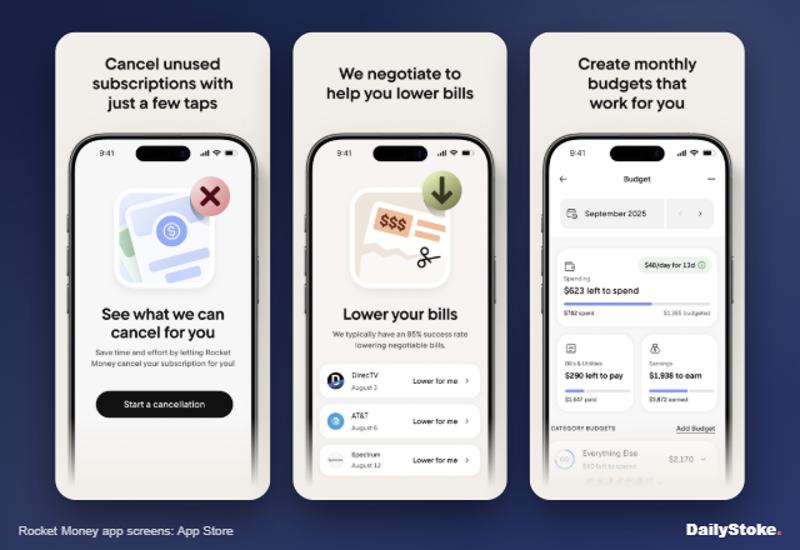
Rocket Money links to your bank and card accounts through Plaid and builds a picture of your spending, income and recurring payments. Its three headline jobs are spotting subscriptions, cancelling them and lowering regular bills. Around that sit budgets, net worth tracking, savings goals and a credit report.
It suits people who feel money slipping away without knowing where, and who would rather the app did the dull work. It is less suited to people who want a strict, hands-on budgeting method.
Rocket Money free vs Premium
The free plan lets you link accounts, see spending by category, review transactions, view your subscriptions and detected bills, track net income, get balance alerts and check your credit score. You can also use bill negotiation, for the fee described below.
Premium adds, according to Rocket Money’s help center:
- Budgets with unlimited custom categories
- Subscription cancellation by Rocket Money’s concierge team
- Net worth tracking
- Full credit reports
- Financial Goals with automated savings
- Real-time account syncing
- Split transactions, tags, rules and manual transactions
- Shared access for family members or financial advisers
- The desktop web version, iOS widgets and data export
How much does Rocket Money cost?
Rocket Money Premium uses a sliding scale: you pick what you pay, and the options can vary over time and by platform. The company’s own pricing guide, updated in January 2026, says Premium typically costs $7 to $14 a month. The in-app purchase options shown on the US App Store range from $2.99 to $9.99, so the price you see may be lower on some devices. New Premium members get a 7-day free trial.
Premium+ costs $15 a month plus tax and removes the bill negotiation fee.
Bill negotiation works on all plans. You connect or upload a bill, and Rocket Money’s team contacts the provider. If it saves you money, you pay a one-time fee of 35% to 60% of the first year’s savings, choosing the percentage within that range. If it saves nothing, you pay nothing. On a cut of $20 a month, that is a fee of $84 to $144 against savings of $240 in year one.
Is Rocket Money safe?
Rocket Money says it never sees your bank login details; they go directly to Plaid, its account connection partner. Data is encrypted in transit with TLS and stored with 256-bit AES encryption, and the company says it uses independent auditors and runs a bug bounty program. You can unlink accounts at any time, and deleting your account deletes your data.
Savings you set aside through Financial Goals are held in a non-interest-bearing custodial account at an FDIC-insured bank, so they earn nothing while they sit there.
What we liked
The subscription view is the best thing in the app. Seeing every recurring charge in one list, with dates and amounts, is often a shock, and the free tier gives you that without paying a cent.
The cancellation concierge removes the friction that keeps people paying for things they do not use. Rocket Money’s guide says a cancellation usually takes 2 to 10 days.
Ratings are strong and consistent: 4.5 on both the US App Store (403,000 ratings) and Google Play (141,000 reviews).
What we did not like
The bill negotiation fee is steep. Taking up to 60% of a year’s savings is a lot for a phone call you could often make yourself. Try calling your provider first.
The pricing model is muddled. A pay-what-you-want plan with different amounts on different platforms makes it hard to say what Rocket Money actually costs.
And as a budgeting tool it is functional rather than transformative. It categorizes and charts well, but it does not push you to plan ahead the way YNAB does.
How Rocket Money compares
Rocket Money vs Monarch: Monarch is the stronger all-in-one household budget at $99.99 a year, with free partner sharing and better investment tracking, but it has no free plan and does not cancel subscriptions for you. Read our Monarch Money review.
Rocket Money vs YNAB: YNAB’s zero-based method changes how you spend; Rocket Money changes what you pay for. Many people would benefit from Rocket Money for a month and YNAB after. See our YNAB review.
Rocket Money vs Copilot: Copilot is a sleeker tracker for Apple users but has no free plan and no cancellation service.
Who should use Rocket Money
Download the free version if you have never audited your subscriptions. Pay for Premium if you want the concierge to cancel things and the budgets that come with it. Skip Premium+ unless you plan to negotiate several large bills.
Rocket Money FAQs
Is Rocket Money free?
Yes, there is a free plan with spending breakdowns, subscription detection, balance alerts and a credit score. Budgets, cancellation help and the web version need Premium.
How much is Rocket Money Premium?
You choose your price. Rocket Money’s pricing guide says Premium typically costs $7 to $14 a month, and App Store options start lower. Premium+ is $15 a month plus tax.
How much does Rocket Money charge for bill negotiation?
A one-time fee of 35% to 60% of the first year’s savings, and only if it lowers your bill. Premium+ members pay no extra fee.
Is Rocket Money legit?
Yes. It is owned by Rocket Companies, a publicly listed company (NYSE: RKT), and connects to banks through Plaid. Like any app with access to your financial data, protect your account with a strong password.
How do I cancel Rocket Money Premium?
In the app, tap the gear icon, then Membership and Manage Membership, slide the price all the way to $0 a month and tap Cancel Subscription. On the website, the steps are the same from the gear icon and Membership. Premium stays active until the end of your billing cycle, and cancelling does not delete your account or stop bill negotiations already under way.