DailyStoke.
  • News
  • Travel
  • Gadgets
  • Diving
  • Canoe Slalom
  • Artistic Swimming
  • Rowing
  • News
DailyStoke.
DailyStoke.
  • Reviews
    • Casino Sites & Offers
    • Bookmakers & Offers
    • Bingo Sites and Offers
  • Bonuses
    • Welcome Offers
    • Free Spins
    • Free Bets
    • No Deposit Deals
  • Gaming Tech
  • Banking
  • Destinations
  • Technology

Xreal XBX a01+ Review: A Cheaper Private Screen, Not The Android XR Model To Wait For

  • July 22, 2026
  • 29 views
  • DailyStoke Team
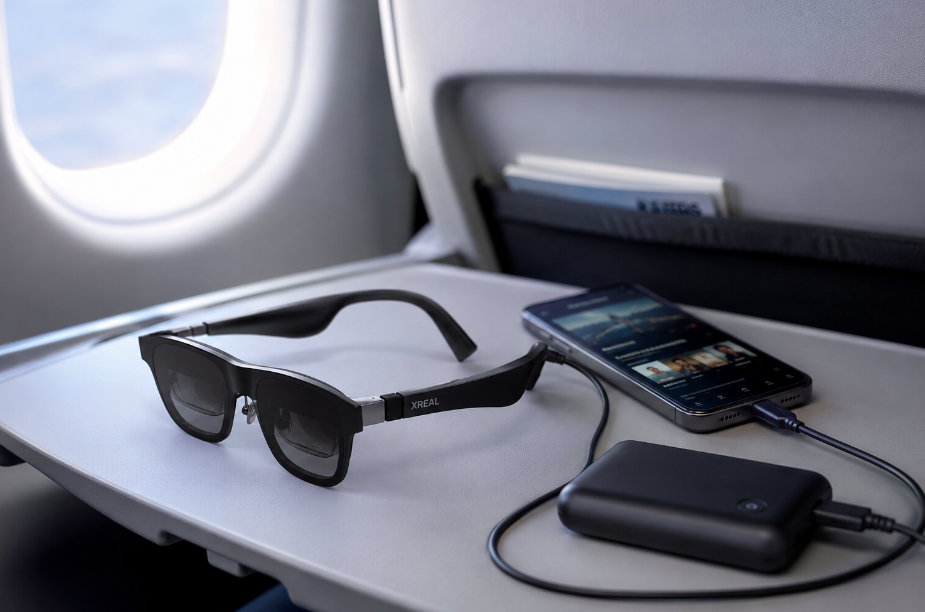
xreal xbx a01 review
Total
0
Shares
0
0
0

The Xreal xbx a01+ is the Xreal pair to consider if you want a private screen for movies, travel, gaming, or working from a laptop in a cramped space without spending Xreal One Pro money.

It is not the Xreal pair to buy if what you really want is Android XR. For that, Xreal Aura is the more important 2026 product to watch.

DailyStoke has not tested this product directly. This review is based on current specifications, independent testing, documented owner experience, and comparison with its closest alternatives.

The practical verdict is fairly simple: the xbx is a sensible budget display-glasses buy if you mainly want a bright wearable screen. It is less compelling if you want spatial computing, AI features, a stable virtual workspace, or a product that feels like the beginning of a new platform.
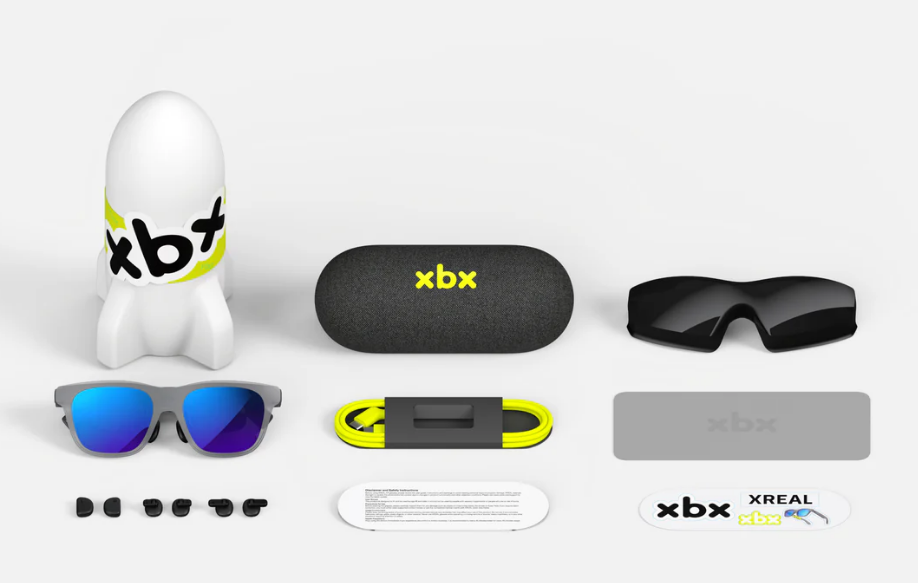
xreal-xbx-a01 what is included in the box
xreal xbx a01 – what is included in the box?

What The xbx a01+ Is For

The xbx a01+ is best understood as a wearable monitor. You plug it into a compatible phone, laptop, tablet, or gaming handheld, and it shows that device’s screen in front of your eyes.

That can be genuinely useful.

On a plane, it can replace squinting at a phone. In bed, it can feel less awkward than holding a tablet. With a Steam Deck or Windows handheld, it gives you a larger private display without needing a TV. In a hotel room, it can make a small device feel more like a personal entertainment setup.

But the xbx is not a standalone computer. It does not have built-in apps. It does not have a battery. Xreal’s published specs do not list a camera or microphones. It is also not the same kind of product as Ray-Ban Meta glasses, which are mainly for photos, video, calls, audio, and AI assistance.

This is display hardware first.

XReal XBX A01 Price And Availability

At the time checked, Xreal’s EU store listed the xbx a01+ at €299, discounted from €369. In the U.S., Xreal lists it at $299.

That price is the main reason this product is interesting. Xreal’s own lineup gets expensive quickly: Xreal One, Xreal 1S, and Xreal One Pro all cost more, and the upcoming Aura is likely to sit in a more ambitious category.

For someone who just wants a private screen, the xbx hits a more comfortable price.

What It Is Like To Live With

The biggest everyday advantage is privacy. You can watch, play, or work without everyone nearby seeing your screen. That is useful on flights, trains, shared couches, and small apartments.

The biggest everyday annoyance is the cable.

Because the xbx has no battery or wireless video system, it needs to stay connected to a source device. That keeps the glasses lighter, but it also means ownership involves more little decisions than the product page suggests. Where does the cable sit? Can your phone charge at the same time? Will your handheld battery survive the flight? Did you pack the right hub?

That is the shape of this product: less bulky than a laptop, but not effortless.

The xbx weighs 62 grams with the front frame and 56 grams without it, according to Xreal. That is light for display glasses and meaningfully lighter than Xreal One Pro. Weight matters because these sit on your face, not on a table.

Still, comfort depends on fit. Nose pads, prescription inserts, face shape, and how well the display lines up with your eyes can decide whether these feel easy to use or mildly irritating. That is one reason buying from a store with a return window matters.

XREAL XBX Display Quality

The display is the best argument for the xbx a01+.

Xreal lists dual micro-OLED displays, 1920 x 1080 resolution per eye in 2D mode, up to 120Hz refresh rate, a 50-degree field of view, HDR10 support, and 1600 nits of eye brightness. Those numbers translate into a simple promise: a bright, sharp private screen for video and gaming.

Independent coverage has generally treated the screen as the xbx’s strongest point. Engadget praised its bright, detailed display for the price, while CGMagazine also found the display experience strong, with some caveats around AI-HDR depending on content.

For movies, streaming, and gaming, that is enough. For replacing a desktop monitor, it is more complicated. Text clarity, edge sharpness, and screen stability matter more when you are reading documents or working across windows for hours.

This is where the cheaper Xreal model starts to show its limits.

Setup And Compatibility

The setup should be simple if your device supports video over USB-C. Plug in the glasses, and the screen appears.

The problem is that not every USB-C port supports video output. That is the compatibility trap with almost every pair of display glasses.

The xbx is a better fit for:

  • iPhone 15, 16, and 17 series
  • MacBooks and many USB-C Windows laptops
  • Steam Deck and many Windows gaming handhelds
  • Some Android phones with DisplayPort over USB-C
  • Tablets with USB-C video output

Be more careful if you plan to use:

  • Budget or midrange Android phones
  • Nintendo Switch or Switch 2 directly
  • HDMI-only devices
  • Locked-down work laptops
  • Streaming apps with external-display restrictions

If your main device is not clearly compatible, do not buy the xbx on hope. Check first.

Battery And Power

The xbx has no built-in battery. Your phone, laptop, tablet, or handheld powers it.

That has one clear benefit: less weight on your face. It also means there is no separate glasses battery to charge.

The downside is that your source device drains faster. For a short movie or a gaming session near an outlet, that may be fine. For a long flight, you should think of the xbx as part of a kit: glasses, source device, battery pack, cable, and possibly a charging hub.

Xreal sells a hub accessory for charging while using glasses. For travel, that accessory may matter more than it looks.

Travel Use

Travel is the xbx’s best case.

A private screen is more useful in an airplane seat than at a desk with a real monitor nearby. The glasses also pack smaller than a laptop and make a phone or handheld feel more capable.

The practical travel setup is not just the glasses, though. You will probably want downloaded content, earbuds, a battery pack, and the right charging adapter. Open-ear speakers are fine in some settings, but earbuds are better if you are sitting close to other people.

The xbx also makes more sense seated than moving. These are not walking-around glasses. They are a screen you wear when you are settled in.

Privacy And Social Concerns

The xbx is less socially complicated than camera glasses because it is not built around recording people.

That matters. Ray-Ban Meta and Meta Ray-Ban Display raise real privacy and etiquette questions because they include cameras and AI features. Xreal’s xbx is mainly a display device.

Still, it is not invisible technology. Wearing dark display glasses with a cable in public will draw some attention. In an airport lounge or airplane seat, that is probably fine. In a meeting or coffee shop, it may feel less natural.

Audio leakage is the other privacy issue. Xreal lists sound-leakage reduction, but open-ear audio can still be heard nearby at higher volumes. If you are watching anything personal or sitting close to strangers, use earbuds.

How The xbx Compares With Other Xreal Glasses

The xbx is the budget entertainment pick.

Xreal One is the better all-around choice if you want screen stability and a more polished spatial-display experience. It costs more, but it includes Xreal’s X1 chip and native 3DoF support, which helps the screen feel more anchored instead of simply following your face.

Xreal One Pro is the premium choice. It has a wider field of view, improved optics, and a more refined display experience. It is also much more expensive and heavier.

Xreal Air 2 Pro may be tempting if discounted, but it is an older model and relies more on accessories for spatial features.

Xreal Aura is the one to wait for if your real interest is Android XR. Aura is not just another screen-mirroring model. Xreal and Google describe it as wired XR glasses powered by Android XR, Gemini integration, Qualcomm’s Snapdragon Reality Elite platform, and a much wider 70-degree field of view. Reservations are open, and Google says Aura is coming this fall.

That makes Aura the more exciting product. It also makes it the riskier early purchase. Price, comfort, launch timing, app support, and real-world polish still need to be proven.

Best Alternatives to Xreal XBX

Xreal One: Best if you want a more stable spatial display and can spend more.

Xreal One Pro: Best premium Xreal option if you want the strongest optics and widest current Xreal display experience.

Xreal Aura: Best reason to wait if you want Android XR, Gemini, immersive apps, and a more platform-driven future.

RayNeo Air 4 Pro: A strong budget rival with similar pricing and a competitive entertainment focus.

Viture Beast: A higher-end alternative for people who want a larger, more premium display-glasses experience.

Ray-Ban Meta: Not a direct alternative. Choose it for camera, AI, calls, and social capture, not for watching movies on a private screen.

Who Should Buy The xbx a01+

Buy it if you want a private screen for travel, movies, handheld gaming, or occasional laptop use, and you have already confirmed your device supports USB-C video output.

It is especially appealing if you want display glasses but do not want to spend €399 to €599 on Xreal’s higher-end models.

Who Should Skip It

Skip it if you want Android XR, camera features, AI assistance, or a more complete spatial-computing platform.

Also skip it if you hate cables, need a dependable work monitor replacement, or are not sure your phone or handheld supports video over USB-C.

For productivity, Xreal One or One Pro makes more sense. For Android XR, wait for Aura. For AI glasses, look at Meta or Samsung’s upcoming Google-connected smart glasses instead.

Buy Now Or Wait?

Buy now if you want an affordable private screen for entertainment and travel. The xbx a01+ is available, relatively light, and priced sensibly for the category.

Wait if your interest is broader than screen mirroring. Xreal Aura could be the more important 2026 product because it is tied to Android XR and Gemini. But until final pricing, launch timing, app support, and real-world comfort are clear, Aura is a reason to wait only if you specifically want that platform.

The clean buying call: buy the xbx for a cheaper wearable screen. Wait for Aura if you want the next step in Xreal’s Android XR story.

Verdict

The Xreal xbx a01+ is a practical budget display-glasses option for people who want a private screen, not a full smart-glasses platform. Its strongest uses are travel, movies, and gaming from a compatible device.

Best For

Travelers, handheld gamers, and people who want a private screen without paying for Xreal’s higher-end models.

Skip It If

You want Android XR, AI features, camera glasses, or a more stable virtual workspace.

What Works

Bright display, light frame, simple wired setup, lower price, and fewer camera-related privacy concerns.

What Does Not

No battery, no standalone apps, cable dependence, device compatibility caveats, and less spatial polish than Xreal One or One Pro.

Buy Now Or Wait?

Buy now for entertainment-first use. Wait for Xreal Aura if you want Android XR.

Total
0
Shares
Share 0
Tweet 0
Pin it 0
More
Read
  • Technology

Best eSIM Apps for Travel in 2026 — Get Internet & Avoid Roaming Fees Worldwide

  • February 22, 2026
  • DailyStoke Team
Read
  • Technology

Best Fitness Trackers for Weightlifting and Strength Training (2025 Edition)

  • July 20, 2025
  • DailyStoke Team
Top Heart Rate Monitors for Workouts
Read
  • Technology

Top Heart Rate Monitors for Workouts

  • July 20, 2025
  • DailyStoke Team
Read
  • Technology

Best Running Watches for Beginners (2025 Guide)

  • July 20, 2025
  • DailyStoke Team
noise canceling headphones for travel
Read
  • Technology

From Bose to Nothing: The Best Travel ANC Headphones of 2025

  • July 11, 2025
  • DailyStoke Team
Top SmartWatches and Wearables for sport
Read
  • Technology

Best Sport Smartwatches for Fitness in 2025

  • July 10, 2025
  • DailyStoke Team
Dont Die App for Android by Blueprint Bryan Johnson
Read
  • Technology

Can This App Make You Healthier? Reviewing Bryan Johnson’s Don’t Die

  • July 7, 2025
  • DailyStoke Team
sailing watches with gps
Read
  • Technology

GPS Sailing Watches 2025: Smarter Tools for Smarter Seas

  • June 27, 2025
  • DailyStoke Team
DAILYSTOKE featured in:

DailyStoke.
  • About
  • Contacts
  • Advertise
  • Disclaimer & Terms
Ⓒ2026. DailyStoke: Entertainment Magazine With A Focus On Online Sports Betting & Casino Gambling.

Input your search keywords and press Enter.