Start with the most important line in this article: in an emergency, call 999 or 112. Both numbers work on any UK mobile, with or without credit, and 112 works across the EU. No app replaces a call to a trained handler, and most of the life-saving technology in your phone works automatically when you dial.
What the right apps and settings can do is make that call faster and more accurate, help you describe where you are on a hillside with no landmarks, and tide you over with first aid until help arrives. We looked at the free tools that UK emergency services, mountain rescue teams and first aid charities actually point people to, and how they fit together on an iPhone or Android phone.
Emergency apps at a glance
| Rank | App or feature | Price | Best for | Standout fact |
|---|---|---|---|---|
| 1 | Phone Emergency SOS and Medical ID | Built in | Everyone | Five quick presses calls for help and alerts your contacts |
| 2 | Advanced Mobile Location (AML) | Built in, automatic | Everyone | Sends your phone’s GPS position when you dial 999 |
| 3 | emergencySMS | Free service | People who cannot make voice calls | Text 999 once you have registered |
| 4 | what3words | Free | Describing an exact spot | Used by many UK emergency services |
| 5 | OS Locate | Free | Hillwalkers | Shows your Ordnance Survey grid reference offline |
| 6 | First aid by British Red Cross | Free | First aid at the scene | Works offline, 20-plus skills |
| 7 | Satellite SOS on iPhone and Pixel | Free on recent models | Walking beyond phone signal | Reaches emergency services with no mobile coverage |
How we chose
We focused on tools that are free, work in the UK, and either connect you to emergency services or make what you tell them more useful. Our picks are based on official guidance from Ordnance Survey, the British Red Cross, NHS ambulance services and the phone makers, store listings and independent reporting, checked in October 2026. We have not tested how emergency control rooms receive the data; where we describe that, it comes from official sources.
Paid “personal safety” subscriptions and apps that call a private monitoring centre rather than 999 did not make the list.
The best emergency apps and settings, ranked
1. Emergency SOS and Medical ID on your phone
Before you download anything, set up the tools already on your phone. On an iPhone, Emergency SOS calls emergency services when you press and hold the side button and a volume button, or press the side button five times if you enable that option; it then texts your location to your emergency contacts. On most Android phones from Android 12, pressing the power button five times starts Emergency SOS, which can call for help, share your location and record video.
Fill in your Medical ID (iPhone, in the Health app) or Emergency information (Android settings). It shows allergies, medication, blood type and emergency contacts on the lock screen, so a paramedic can read it without unlocking your phone. iPhone 14 and later also have Crash Detection, and iPhone’s Check In can tell a friend automatically when you arrive home.
Price: built in
Pros
- Works without installing anything
- Medical details visible to responders from the lock screen
Cons
- Easy to trigger accidentally if set to auto-call
- Only useful if you set it up beforehand
2. Advanced Mobile Location (AML)
AML is not an app but it is the reason a 999 call from a mobile is far more precise than it used to be. Developed in the UK in 2014 by BT, EE and HTC, it switches on your phone’s GPS and Wi-Fi location when you dial 999 or 112 and sends the result by text to the emergency services, alongside your call. iPhones have supported it since iOS 11.3 in March 2018; on Android it is part of Google’s Emergency Location Service.
You do not need to do anything, other than check that location services are not fully disabled (on Android, look for Emergency Location Service in location settings). Since March 2022 every smartphone sold in the EU must support AML.
Price: built in
Pros
- Automatic, no app, no setup
- Gives control rooms a GPS-grade fix
Cons
- Needs a mobile connection to send the location text
- Indoors or in deep valleys, accuracy can drop
3. emergencySMS
emergencySMS lets you text 999 to reach police, ambulance, fire and rescue, and HM Coastguard. It is designed for people who are deaf, hard of hearing or have speech difficulties, and you must register in advance: text the word “register” to 999, read the reply explaining the service, reply “yes”, and wait for confirmation that your number is registered. The emergencySMS website has a British Sign Language video walkthrough.
It is not a general text option for everyone. If you can make a voice call, call. But if you or someone you travel with cannot, registering takes two minutes and should be done today, not on the hill.
Price: free
Pros
- Text access to all four UK emergency services
- Registration takes minutes
Cons
- Useless if not registered beforehand
- Texts are slower than a voice call
4. what3words
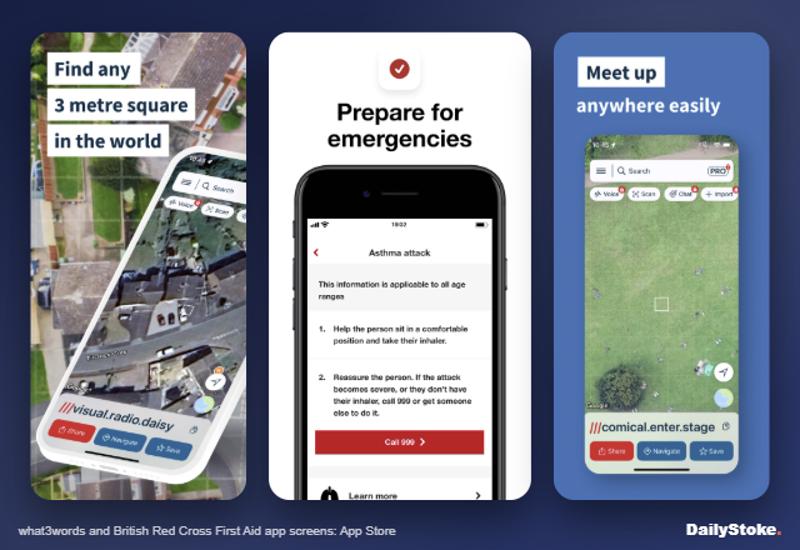
what3words divides the world into 3m squares, each named by three words, such as a unique address for a spot on a beach or a fell. Many UK police, fire and ambulance services accept a what3words address, and some send callers a link that opens the app and reads out the words.
It is free on iOS and Android and the basic lookup works offline. It has critics: University of Exeter data scientist Rudy Arthur estimated in 2023 that 20 to 25 per cent of addresses have more than three similar-sounding alternatives that could be confused, as The Register reported. what3words disputes this and puts the chance of a confusion far lower. Use it as an extra, read the words back carefully, and let AML do the heavy lifting.
Price: free
Pros
- Easy to read out over a bad line
- Widely recognised by UK emergency services
Cons
- Similar-sounding words can be misheard
- Proprietary system; mountain rescue teams often prefer grid references
5. OS Locate
Ordnance Survey’s free OS Locate shows your position as an Ordnance Survey grid reference, latitude and longitude, plus altitude and a compass, using your phone’s GPS without needing a signal. A six- or eight-figure grid reference is the language British mountain rescue teams and paper maps speak, which makes this a sensible app for anyone heading onto the hills with an OS map.
The app is basic and has not been updated since 2022, according to app-tracking data, so open it before your trip and make sure it still runs on your phone.
Price: free
Pros
- Grid references that rescuers understand
- Works with no mobile signal
Cons
- Ageing app with no recent updates
- No maps, just a position readout
6. First aid by British Red Cross
The British Red Cross’s free first aid app covers more than 20 skills, from heavy bleeding and burns to broken bones and someone who is not breathing, with step-by-step guides, short videos and quizzes. Crucially, it works offline once installed, which matters on a mountainside or in a car park with one bar of signal.
A separate Baby and child first aid app covers 17 skills for parents and carers and lets you record a child’s medication and allergies. Both are made for the UK, so the advice matches what you would learn on a British Red Cross course.
Price: free
Pros
- Clear, UK-specific guidance that works offline
- Quizzes help it stick before you need it
Cons
- No substitute for a hands-on course
- You need to have opened it before the emergency
7. Satellite SOS on iPhone and Pixel
When there is no mobile signal at all, recent phones can contact emergency services by satellite. Emergency SOS via satellite works on iPhone 14 and later and has been live in the UK since December 2022; it asks a few questions about your emergency and relays the answers with your location. Google’s Satellite SOS works on Pixel 9 and later models, except the Pixel 9a, in the UK and some 30 European countries. Samsung has added satellite features to select Galaxy phones through Virgin Media O2’s O2 Satellite service in the UK.
Try the demo mode on iPhone or Pixel before you rely on it, and remember a dedicated device lasts longer in the cold. Our best satellite communicators guide covers Garmin inReach and ZOLEO.
Price: free on supported phones
Pros
- Works where there is no mobile coverage at all
- Guided questions speed up the response
Cons
- Needs a clear view of the sky
- Your phone’s battery is the weak link
Buying guide: building a phone that helps in an emergency
Do the setup now. Medical ID, emergency contacts, Emergency SOS and emergencySMS registration all need to be done before an emergency. Ten minutes at home is worth more than any download.
Leave location services on. AML and satellite SOS need them. You can restrict location for individual apps and still allow emergency services to find you.
Keep the government alerts on. UK Emergency Alerts arrive as a loud siren-like alert on compatible phones for threats to life such as severe flooding. No app is needed; check that Emergency Alerts are enabled in your phone’s notification settings.
Download offline maps. In the hills a map you can see without signal matters as much as any SOS tool. Apps such as Organic Maps, AllTrails and Komoot offer offline maps, and a paper OS map and compass weigh almost nothing.
Carry power. A small power bank does more for your safety than another app.
What to ignore. Apps that promise to “replace 999”, private panic-button subscriptions that route to call centres, and anything that needs an account and signal to work in an emergency.
Emergency apps in the US and Europe
Abroad, the principle is the same: call the local number first. 112 works across the EU and in many other countries, so it is the one number worth memorising. In the US, call 911; text-to-911 is available in many areas but not all, and the free FEMA app and the American Red Cross emergency and first aid apps provide alerts and guidance. Some European countries run their own 112 apps, such as Italy’s free 112 Where ARE U, which sends your location to the 112 control room where the service operates and offers a silent call option if you cannot speak. You need to register in the app before you travel.
Emergency app FAQs
Should I call 999 or use an app?
Call 999 or 112. Your phone automatically sends your precise location to the control room through AML when you do. Apps such as what3words and OS Locate help you answer the question “where are you?” more precisely, but they do not replace the call.
Can I text 999 in the UK?
Only if you have registered with emergencySMS, which is designed for people who cannot make voice calls. Text “register” to 999, reply “yes” to the information message and wait for confirmation. Do it in advance.
Do UK emergency services use what3words?
Many UK police, fire and ambulance services accept what3words addresses, and some send a link that lets the app read the words to them. Mountain rescue teams also understand Ordnance Survey grid references, so it is worth knowing how to give one from OS Locate.
Does iPhone satellite SOS work in the UK?
Yes. Emergency SOS via satellite has worked in the UK since December 2022 on iPhone 14 and later. It needs a clear view of the sky and works only when there is no mobile network available.
What is the best free first aid app in the UK?
The British Red Cross’s First aid app is free, works offline and follows UK first aid guidance. The charity’s Baby and child first aid app covers infants and children. Neither replaces a first aid course.
What should I put in my emergency contacts?
Add at least two people who are likely to answer, and label them clearly. On iPhone, emergency contacts set in Medical ID also receive a text with your location when you use Emergency SOS.