Roaming caps, patchy rural coverage and long-haul trips all lead to the same moment: you need a map, and your phone has no data. An offline map app solves it, as long as you downloaded the right area before you left the hotel Wi-Fi.
We compared seven offline map apps, from the giants on every phone to open-source specialists built on OpenStreetMap. Some are best for driving, some for walking and some for both. Prices come from the UK App Store and the makers’ own pages, and this guide is based on official documentation, store listings and owner reviews rather than our own field tests.
Offline map apps at a glance
| Rank | App | Price (UK) | Best for | Standout fact |
|---|---|---|---|---|
| 1 | OsmAnd | Free (5 to 7 maps); Maps+ £14.99 a year or £69.99 once; Pro £39.99 a year | Power users and hikers | Contours, hillshade and hourly map updates on Pro |
| 2 | Organic Maps | Free | A simple, private offline map | Every feature works offline, with no ads |
| 3 | Apple Maps | Free | iPhone owners | Offline walking, cycling and transit directions |
| 4 | Google Maps | Free | Driving abroad | Offline driving directions inside your downloaded area |
| 5 | Guru Maps | Free; Pro £23 a year or £69 once | iPhone hikers and overlanders | 3D relief and offline CarPlay |
| 6 | HERE WeGo | Free | Driving with whole-country downloads | Download a region, country or continent |
| 7 | Maps.me | Free with ads; ad removal extra | Familiar travel guides | Daily OpenStreetMap updates |
How we picked these offline navigation apps
We judged each app on what works without a signal (search, routing, which kinds of directions), map detail for walkers, download size and update rules, privacy, battery and price. What works without a connection is taken from each maker’s own documentation and store listing, checked against owner reviews. We did not run our own aeroplane-mode tests for this guide: it is based on official documentation, store listings and owner reviews. Ratings come from the App Store and Google Play. Two of these apps, Organic Maps and OsmAnd, have full DailyStoke reviews.
The best offline map apps, ranked
1. OsmAnd
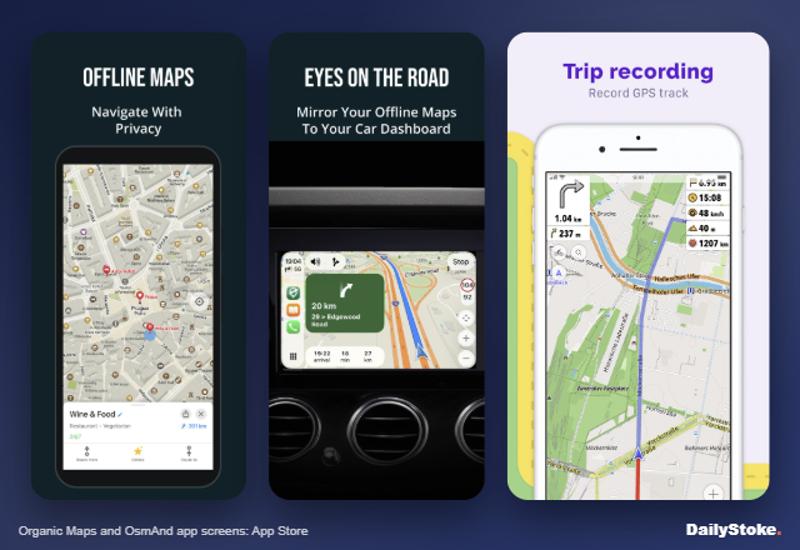
OsmAnd is the most capable offline map you can put on a phone. It uses OpenStreetMap data with walking, cycling and driving navigation, offline search, track recording and GPX tools, and the Maps+ upgrade adds contour lines and terrain, Wikipedia and Wikivoyage guides offline, nautical depths and CarPlay or Android Auto. Pro adds hourly live map updates, 3D relief, a weather layer and cloud backup.
The free version limits downloads: OsmAnd’s documentation says five maps on iPhone and seven on Android, with updates counting towards the total. That is enough for a single trip; frequent travellers should pay. The interface is dense and configurable, which delights some people and baffles others. The UK App Store shows 4.5/5 from 893 ratings.
Read our full OsmAnd review.
Price: free with download limits; Maps+ £14.99 a year or £69.99 once; Pro £5.99 a month or £39.99 a year.
Pros
- Contours, hillshade and hiking routes for walkers
- One-off Maps+ purchase available
- Purchases work across iPhone, Android and web
Cons
- Cluttered, complicated menus
- Free tier caps map downloads
2. Organic Maps
Organic Maps is the app we recommend to most travellers. It is free, open source and made by a small team in Estonia that includes founders of the original MAPS.ME. Download a country and everything works offline: search, turn-by-turn directions for walking, cycling and driving, hiking paths and contour lines. There are no adverts, no account and, according to its App Store privacy label, no data collected.
It is simpler than OsmAnd, which is the point. You lose some depth, such as custom map styles and live updates, but gain an app anyone can use in a minute.
Read our full Organic Maps review.
Price: free; donations optional.
Pros
- Free, with no ads or tracking
- Clean, fast interface
- Hiking paths and contours included
Cons
- No traffic or live transit data
- OpenStreetMap detail varies by country
3. Apple Maps
Since iOS 17, Apple Maps lets you download an area for offline use, and Apple says you then get turn-by-turn directions for driving, walking, cycling and transit, plus place details such as opening hours and estimated arrival times. Downloads update automatically by default and can be limited to Wi-Fi. You can view offline maps on Apple Watch when your iPhone is nearby.
The catches: offline maps are available only in select areas, features vary by country, and downloads do not sync between your devices. With Optimise Storage on, unused offline maps can be deleted automatically.
Price: free on iPhone (iOS 17 or later).
Pros
- Offline walking and transit directions
- Already on every iPhone
- Automatic updates
Cons
- iPhone only
- Not available in every region
4. Google Maps
Google Maps offline is fine for driving and checking where you are, but it is more limited than many people assume. Google’s help pages say navigation works offline only if the whole route sits inside your downloaded area, and transit, cycling and walking directions are not available offline. Driving offline gives no traffic information or alternative routes.
Downloaded maps expire and must be updated; Google Maps tries to update them automatically on Wi-Fi when they are within 15 days of expiry. Offline maps cannot be downloaded in some countries or regions, which Google attributes to contractual limits, language support and address formats.
Price: free.
Pros
- Familiar, with the best business listings
- Offline driving directions
- Can save to an SD card on Android
Cons
- No offline walking directions
- Maps expire and need updates
5. Guru Maps
Guru Maps is a polished, ad-free offline map for iPhone and Android, developed by Evgen Bodunov. It offers country or regional downloads with monthly updates, voice-guided navigation with lane guidance, GPX and KML import and export, track recording and true 3D relief with contours and hillshade. On Apple Watch, live stats and turn-by-turn navigation are free, and CarPlay works offline.
It scores 4.7/5 from 847 ratings on the UK App Store, and it is the best-looking app here.
Price: free; Pro £2.39 a month (seven-day free trial), £23 a year or £69 once (UK App Store).
Pros
- Clean design with 3D terrain
- Offline CarPlay and Apple Watch navigation
- No adverts
Cons
- Track recording on the watch is a Pro feature
- Smaller community than OsmAnd
6. HERE WeGo
HERE WeGo, from the mapping company HERE, lets you download a region, a whole country or a continent and navigate without a connection. The App Store listing also cites public transport routing in more than 1,900 cities, and the app works with CarPlay. It is free with no in-app purchases listed on the US App Store.
It is aimed at drivers rather than walkers, and its US App Store score of 3.7/5 from about 1,600 ratings trails the others here.
Price: free.
Pros
- Whole-country and continent downloads
- No subscription
- CarPlay support
Cons
- Weak for footpaths and hiking
- Lower ratings than rivals
7. Maps.me
Maps.me was once the default offline map for backpackers. It still offers offline maps, search and driving, walking and cycling directions on OpenStreetMap data updated daily, plus travel guides. Today it carries adverts, sells ad removal and guide subscriptions, and its App Store privacy label lists a long list of data linked to you, including precise location and a user ID used for advertising.
The App Store lists the developer as Convexity Holdings AG. Several of Maps.me’s original founders now run Organic Maps, which we prefer.
Price: free with ads; optional subscriptions remove adverts and add guides, with the sterling price shown in the store before you buy.
Pros
- Familiar and fast
- Walking and cycling directions offline
Cons
- Adverts in the free app
- Heavy data collection by comparison
What works offline, app by app
| App | Offline search | Offline driving | Offline walking | Contour lines | Ads |
|---|---|---|---|---|---|
| OsmAnd | Yes | Yes | Yes | Maps+ and Pro | Free version only |
| Organic Maps | Yes | Yes | Yes | Yes | None |
| Apple Maps | Yes | Yes | Yes | No | None |
| Google Maps | Yes | Yes, no traffic | No | No | None |
| Guru Maps | Yes | Yes | Yes | Yes | None |
| HERE WeGo | Yes | Yes | Not stated | No | None listed |
| Maps.me | Yes | Yes | Yes | Yes (terrain layer) | Yes |
The table is built from each maker’s documentation and store listing. HERE says turn-by-turn guidance works offline but does not say which travel modes it covers, so we have not counted walking. The pattern is clear: if you want walking directions with no signal, skip Google Maps and pick one of the OpenStreetMap apps or, on iPhone, Apple Maps.
Choosing an offline map: what matters
Know what works offline. Map display is easy; routing is not. Google Maps drops walking directions offline, while Apple Maps, Organic Maps, OsmAnd and Guru Maps keep them.
Download before you go. Use Wi-Fi at home or the hotel. Country files can run to hundreds of megabytes.
Test in aeroplane mode. Search for your hotel and route to it with data off before you rely on it.
Walkers need contours. OsmAnd, Organic Maps and Guru Maps show contour lines. For British hills, add OS mapping: see our best hiking apps guide.
Watch privacy labels. Free apps funded by adverts tend to collect more data. Organic Maps collects none, according to its listing.
What to ignore. Download counts and glossy travel guides matter less than whether the app routes you on foot without signal.
Offline maps FAQs
What is the best free offline maps app?
Organic Maps for most people: it is free, ad-free and works fully offline. OsmAnd’s free version is more powerful but limits downloads.
Does Google Maps work offline for walking?
No. Google says walking, cycling and transit directions are not available offline. You can still see your position on a downloaded map.
Can Apple Maps be used offline?
Yes, on iOS 17 or later. Apple says offline maps give driving, walking, cycling and transit directions, in select areas.
Do offline maps use GPS without data?
Yes. GPS works without mobile data, so your position shows on any map you have downloaded.
Which offline map app is best for hiking?
OsmAnd, for contours, hiking routes and GPX tools. Organic Maps is a simpler free alternative. In Britain, add OS Maps for 1:25,000 detail.
Is Maps.me still good?
It works, but it now has adverts and collects more data than rivals. Organic Maps, started by several of Maps.me’s founders, is the cleaner choice.
More on DailyStoke
OsmAnd review · Organic Maps review · Best hiking apps compared · Gaia GPS review · Travel eSIMs compared · Travel apps, reviewed